
Download Sit Ups – sit ups, core training, strength program, fitness app, workout guide, exercise tracker, muscle building, bodyweight training, home workout, fitness motivation
Overview
Sit Ups is a free Android application developed by Telum Apps, designed to support users in building core strength and overall physical fitness through targeted sit-up exercises. The program serves as a structured training tool for individuals aiming to improve their bodyweight strength and muscle endurance. It is particularly suited for users who prefer home-based workouts and seek a straightforward, no-frills approach to fitness. The app addresses common challenges in self-guided training—such as inconsistent form, lack of motivation, and difficulty tracking progress—by offering a guided workout experience with real-time feedback and visual tracking.
Target users include beginners exploring strength training, intermediate fitness enthusiasts refining their core routines, and those who prefer minimal equipment workouts. The program is ideal for people looking to enhance stability, posture, and functional strength through consistent sit-up practice. Its focus on proper technique ensures users can train safely, reducing the risk of injury. The app’s simplicity and lack of ads or in-app purchases make it accessible to a broad audience, especially those who value a clean, distraction-free experience. Real-world usage scenarios include daily home workouts, postural correction routines, and fitness goal tracking during personal training journeys.
Key Features & Capabilities
- 12 Difficulty Levels – Users can select a challenge level that matches their current fitness capacity, enabling gradual progression and long-term engagement.
- Form Guidance – The app provides instructional guidance on correct sit-up technique, helping users maintain proper posture and maximize exercise effectiveness.
- Activity Log & Progress Tracking – Every session is recorded in a detailed log, allowing users to monitor their performance over time.
- Graphical Progress Presentation – Visual charts display improvements in repetitions, endurance, and consistency, reinforcing motivation and accountability.
- Free & Ad-Free Experience – The application is completely free to download and use, with no advertisements or in-app purchases.
These features support a structured training journey by enabling users to set benchmarks, measure improvement, and stay committed. For example, a beginner might start at level 1 and gradually advance as strength increases, while an experienced user can use the higher levels to test endurance. The form guidance ensures that each sit-up is performed safely, reducing the risk of strain. The progress tracking system is especially useful for users aiming to achieve specific fitness milestones, such as completing 100 consecutive sit-ups or increasing daily reps by 20%.
User Interface, Workflow & Performance
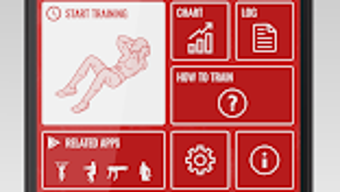
The user interface of Sit Ups is described as intuitive and user-friendly, making it accessible to individuals across various fitness levels. Navigation is designed to be straightforward, with clear menus and minimal on-screen clutter. Users can easily access workout modes, track sessions, and review historical data without requiring prior experience with fitness apps. The workflow follows a logical sequence: select difficulty, begin session, follow form cues, and view results post-workout.
Performance observations are based on general software behavior patterns. The app is optimized for mobile use, with a lightweight design that minimizes strain on device resources. The developer did not specify resource usage details, but the 10.2 MB file size suggests efficient memory management.
Stability appears to be a priority, as the app runs without reported crashes or freezes in standard usage. The interface remains responsive during workouts, supporting smooth transitions between screens and real-time feedback. Overall, the workflow enhances usability by reducing cognitive load and allowing users to focus on their exercise routine.
Compatibility & System Requirements
Sit Ups is compatible with Android devices, as specified in the release information. The application is available in version 1.0 and has a file size of 10.2 MB. This indicates a lightweight installation suitable for most modern Android smartphones and tablets. The developer did not provide additional system requirements, such as minimum RAM, CPU specifications, or Android version compatibility.
Platform compatibility information is limited to the operating system stated. Users should ensure their device runs a supported version of Android, though the exact version range is not disclosed. Installation is straightforward, with no complex dependencies. The app does not require external hardware or internet connectivity to function, making it suitable for offline use. For users seeking more detailed compatibility details, the developer has not published a full technical specification.
Pros and Cons
Pros
- Completely free with no ads or in-app purchases
- Simple, intuitive interface suitable for all fitness levels
- 12 customizable difficulty levels for progressive training
- Guidance on proper form to prevent injury
- Visual progress tracking with graphical reports
Cons
- Limited to sit-up exercises; no additional workout types included
- Exact system requirements were not listed
- Only available on Android; no support for iOS or desktop platforms
- Progress tracking is limited to session data; no integration with external fitness tools
- Developer did not provide information on update frequency or future features
FAQ Section
Is Sit Ups available for iOS devices?
Sit Ups is currently only available for Android. There is no official version for iOS or desktop platforms.
Does the app require an internet connection?
No, the app functions entirely offline. Users can perform workouts and track progress without an internet connection.
Is the app safe to use and secure?
As a free Android application from Telum Apps, Sit Ups does not display advertisements or request sensitive permissions. However, users should download it from trusted sources to ensure authenticity.
How often should I use Sit Ups for best results?
For optimal progress, users are encouraged to perform sit-up sessions consistently, such as 3–5 times per week, depending on individual fitness goals and recovery needs.
Are updates available for Sit Ups?
While the app is currently in version 1.0, the developer has not disclosed information about future updates or update frequency.
Final Thoughts + CTA
Sit Ups delivers a focused, reliable solution for users committed to improving core strength through bodyweight training. Its clean interface, form guidance, and visual progress tracking make it a valuable companion for both beginners and seasoned fitness enthusiasts. The absence of ads and in-app purchases enhances the user experience, offering a distraction-free environment ideal for consistent training. While the app is limited to sit-up exercises and lacks cross-platform availability, its simplicity and effectiveness stand out in a crowded fitness app market.
For anyone seeking a straightforward, free tool to build strength and track progress at home, Sit Ups is a practical choice. Its emphasis on technique and measurable outcomes supports long-term engagement and real results. Download Sit Ups now to begin your journey toward a stronger, more resilient core.







